

Learning Temporal the hard way
Building an ETL pipeline with durable execution

My first Temporal workflow failed for a reason that had nothing to do with my API, my database, or my code correctness.
The payload was too large.

That was my introduction to durable execution. Temporal stores workflow state in an event history so it can replay and recover from checkpoints. That design is what gives you reliability, but it also means you cannot treat an ETL workflow like a normal script that can load huge data into memory and move on.
I was building an ETL pipeline for Channel Chief, Deriv’s internal application that provides leadership with real-time organisational insights through daily reporting. The pipeline ingests public conversations from our internal communication tools, so reliability mattered. I chose Temporal as the orchestrator, assuming it was just another DAG-style tool. Instead, durable execution taught me where that assumption breaks.
Here’s what I learned, the problems I hit, and the solutions that eventually worked
The core challenge: Durable execution
Temporal’s defining feature is durable execution: your workflows never fail (well, they do, but they retry with exponential backoff until they succeed, up to your maximum attempt limit). If a workflow fails, it continues from the last checkpoint in the workflow.
This sounds great until you realise the implications.
The payload size problem
Temporal saves state in an event history to enable checkpoint recovery. This event history has a payload size limit. I hit this limit immediately when fetching large datasets from APIs.
Here’s why the limit exists: imagine you fetch a massive payload from an API. The workflow fails. Temporal retries from the last checkpoint, which means re-fetching that huge payload, processing it, and saving it to the history again. The workflow keeps retrying with this enormous payload, consuming computation and bloating the event history until performance degrades.
You can technically override the payload limit in the config (though not through the Python SDK—only in Go), but that’s fighting the design rather than working with it.
The solution: continue_as_new and child workflows
Temporal provides two features to handle this:
continue_as_new: Creates a fresh, empty event history to run the workflow. Think of it as starting with a clean slate while maintaining workflow continuity.
Child workflows: Instead of processing all items in a single workflow, you iterate through items and batch them into separate child workflows—one workflow per item.
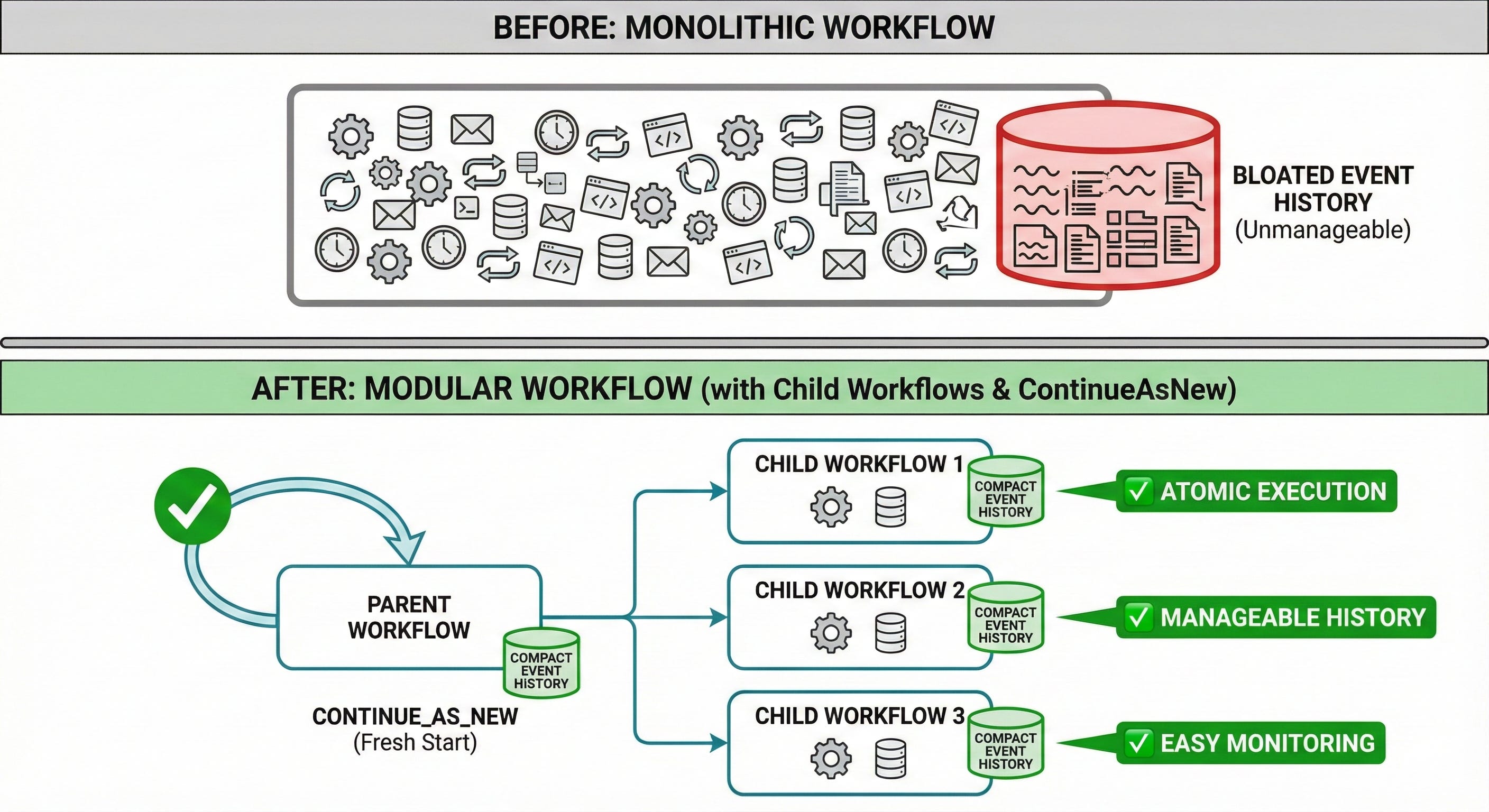
This approach gives you:
Decoupled, atomic workflows
Easier monitoring of workflow progression
Manageable event history sizes
I learned to structure my pipeline this way rather than cramming everything into monolithic workflows.
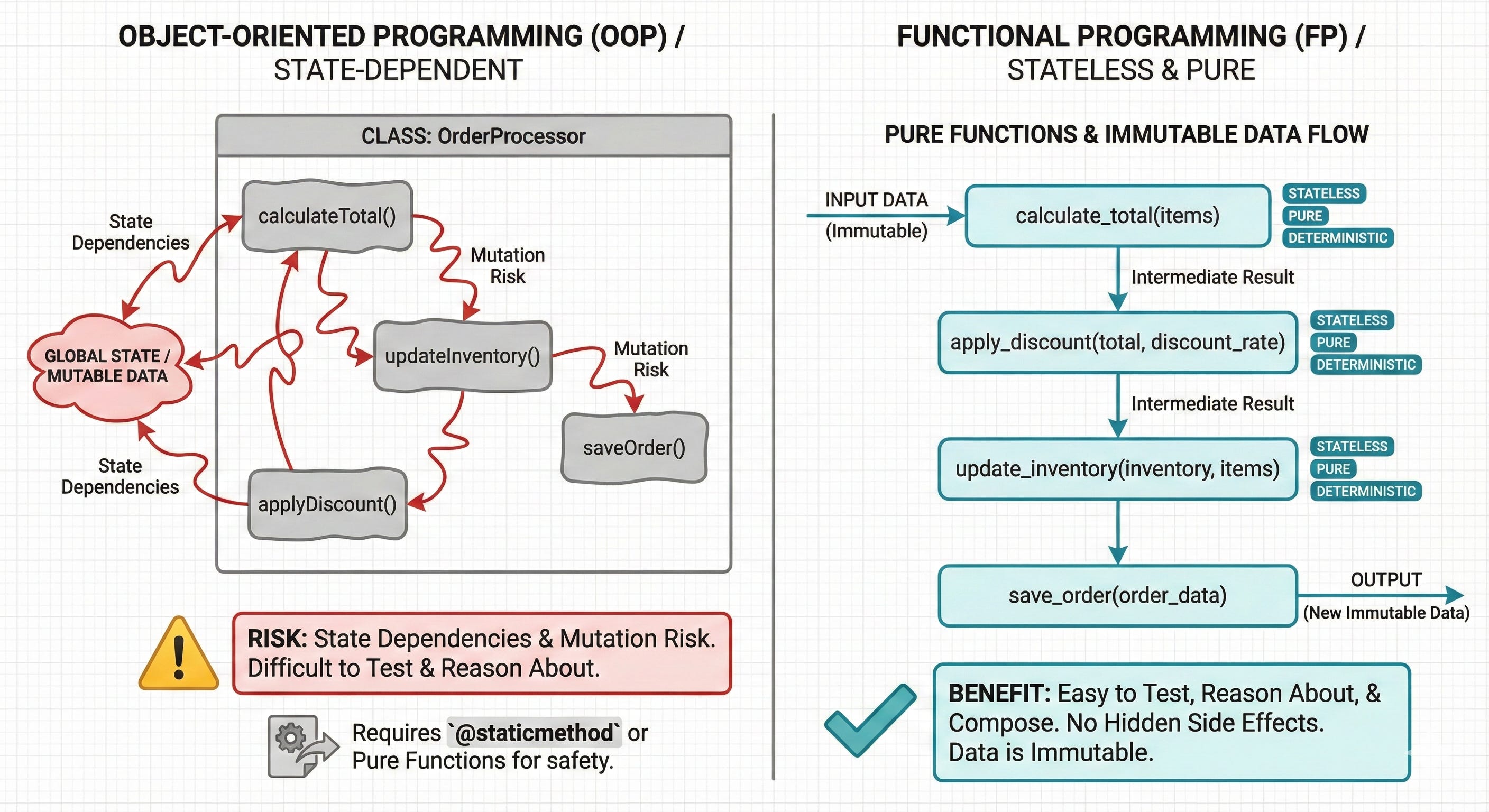
Functional vs OOP: Choose functional
In Temporal, workflow components are Activities (functions or methods that do the actual work). I went with OOP initially because VSCode’s IntelliSense made it easy to access methods within classes.
If I could start over, I’d use functional programming.
The problem with OOP in Temporal is that you need stateless classes. Durable execution means you can’t maintain state within Temporal. You must design either:
Static methods (
@staticmethod)Methods that behave like pure functions without mutating object attributes
Essentially, you’re writing functions inside classes. Just write functions.
The non-deterministic trap
I hit a non-deterministic error when I used datetime.now() in a workflow.
The error message introduced me to another data engineering concept (along with idempotency): non-determinism, which is when a process produces inconsistent values across runs.
Here’s what happened: When a workflow crashes and retries, Temporal needs to ensure the replayed workflow has the same values as the first execution. Using datetime.now() produces different values on each retry since it dynamically changes based on the current time.
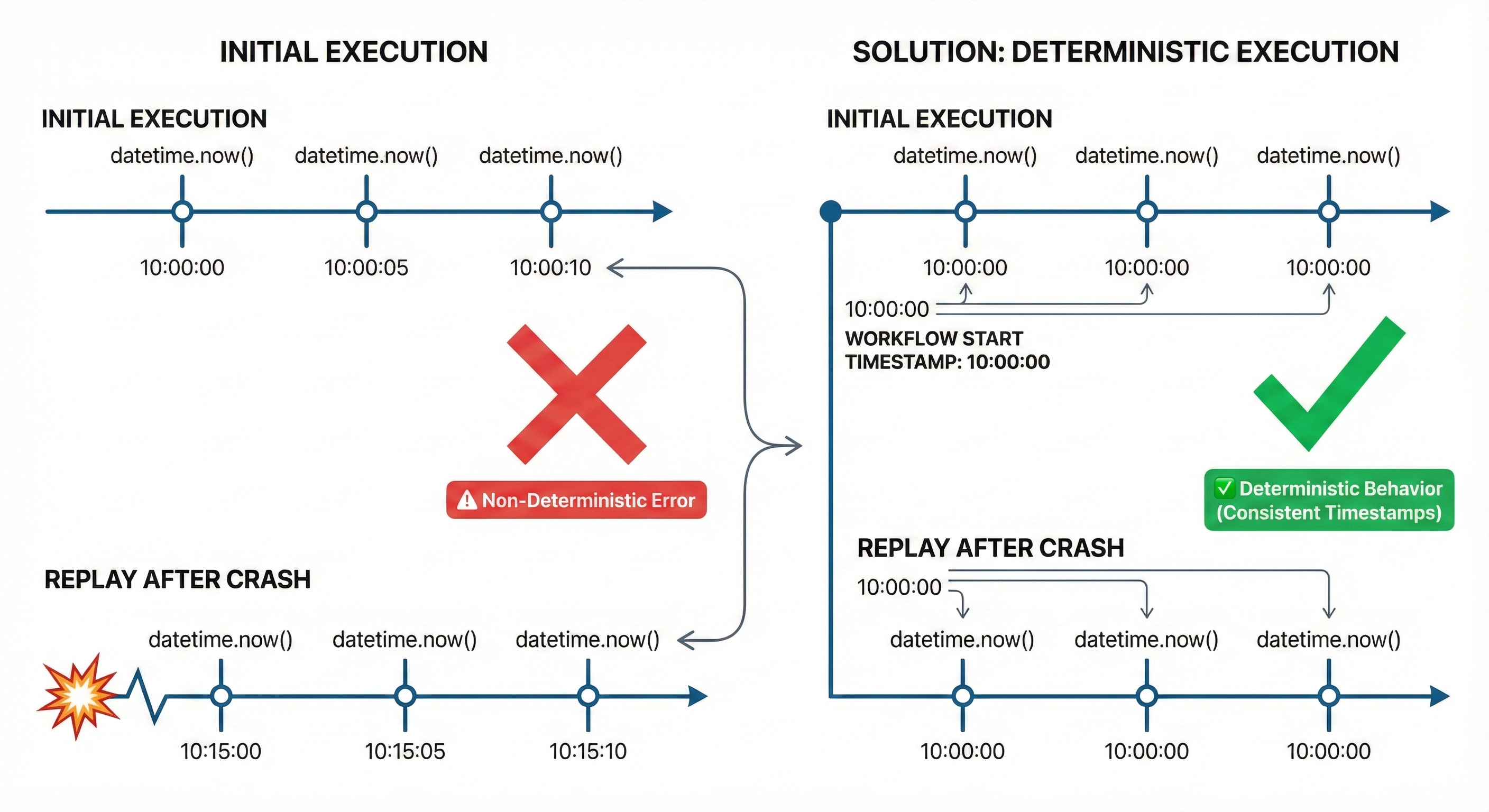
The fix: Declare the current time on the client side before starting the workflow. This ensures the time value (like now or yesterday) remains consistent across retries and checkpoints, making it acceptable to Temporal.
Temporal enforces this strictly because durable execution depends on deterministic replay.
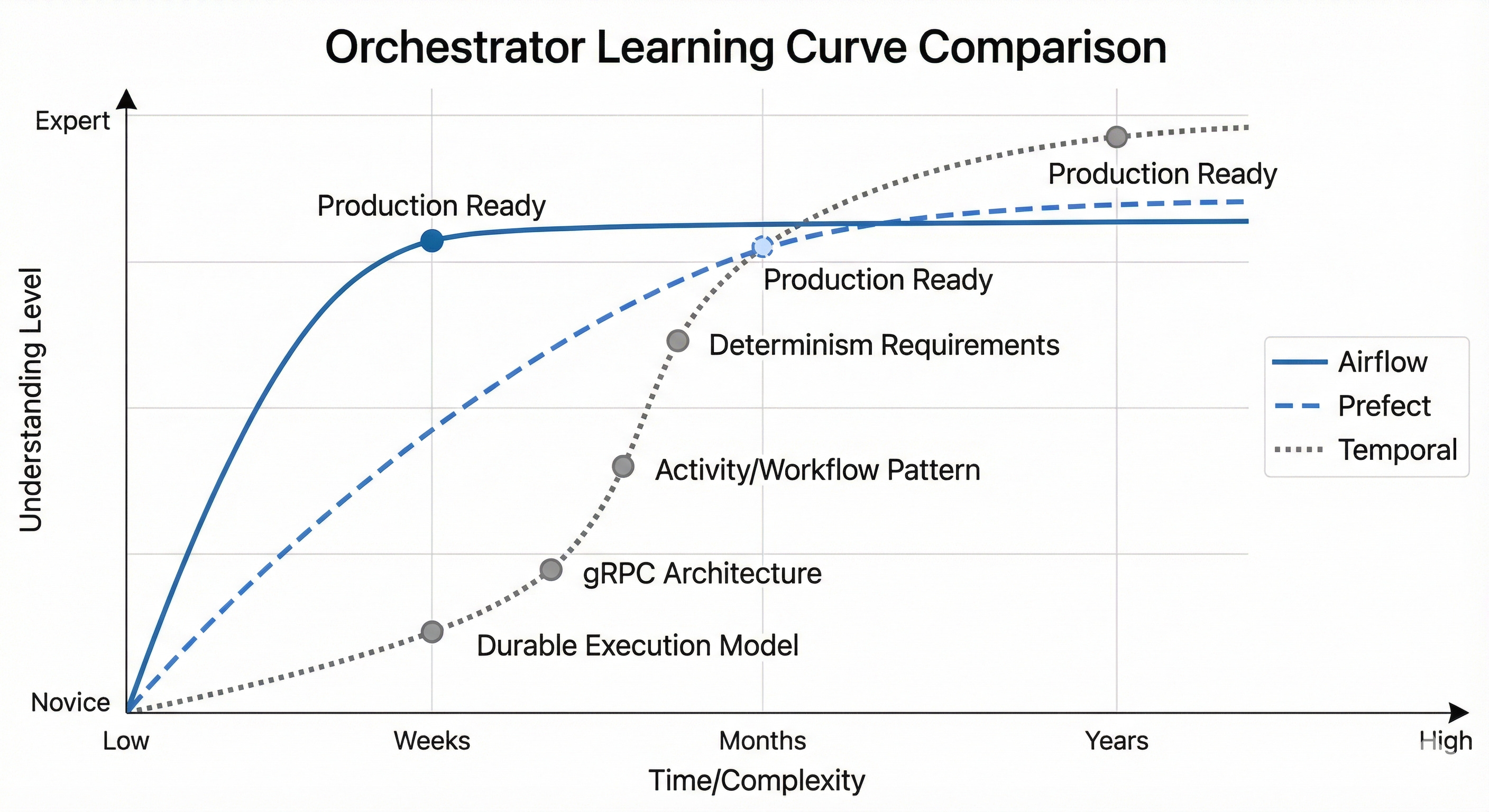
Steep learning curve
I’ve used Airflow, Prefect, and DAGs before. Temporal gave me the steepest learning curve, primarily because:
Durable execution is a fundamentally different model
gRPC architecture adds complexity
The method of running Activities and Workflows differs from DAG-based orchestrators that simply wrap and execute functions
During development, I kept asking myself: “Why is it limiting payload size and history? My machine handles this fine without Temporal!” Multiple times, I asked myself why I used this tool.
The answer lies in Temporal’s architecture. It’s designed for retry mechanisms, state checkpointing, and durability features. However, thinking about Temporal’s architecture with retry, state checkpointing, and durability features, I was insistent on grasping and understanding it better. These features require architectural constraints that don’t exist in simpler orchestrators.
The Signal, Message, and Query problem
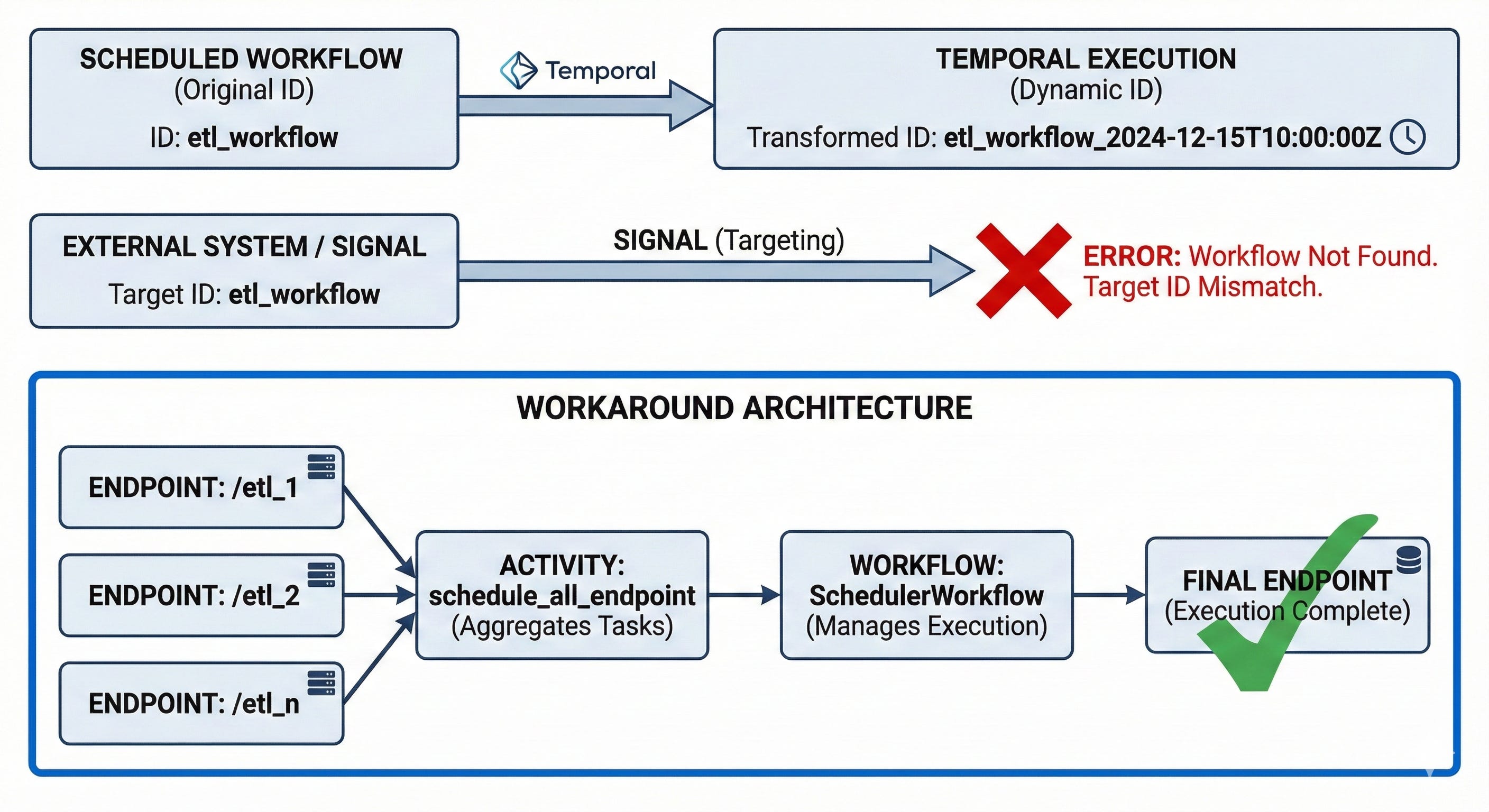
Temporal supports three inter-workflow communication patterns: Signal, Message, and Query. At the moment, I’ve just used Signal and not the latter two, although the implementation was not pushed to production. I focused on Signal to schedule a series of dependent workflows that communicate through signals.
The scheduling workaround
I hit a roadblock: Signal requires a static workflow ID to send messages to the correct workflow. When you schedule a workflow in Temporal, it appends a timestamp to the workflow ID, making it dynamic. This makes it nearly impossible to hardcode the workflow ID accurately (using .now() is inaccurate due to the timing).
This issue appears in the Temporal community forum and GitHub issues, but hasn’t been patched yet.
Here’s my workaround:
Ensure all workflows trigger via endpoints:
/etl_1,/etl_2,/etl_n...Create an Activity that calls these endpoints:
/schedule_all_endpointCreate a workflow that calls this endpoint:
SchedulerWorkflowCreate an endpoint with a client to schedule this workflow
Trigger this endpoint. Boom—scheduled.
Not elegant, but it works around the dynamic workflow ID limitation.
Everything must be async
Temporal requires asynchronous execution throughout. One workflow might be async relative to another workflow, but dependent workflows must complete before subsequent ones run.
Every function should support async:
API requests
Database queries
Any I/O or CPU-bound process
Blocking operations become synchronous bottlenecks.
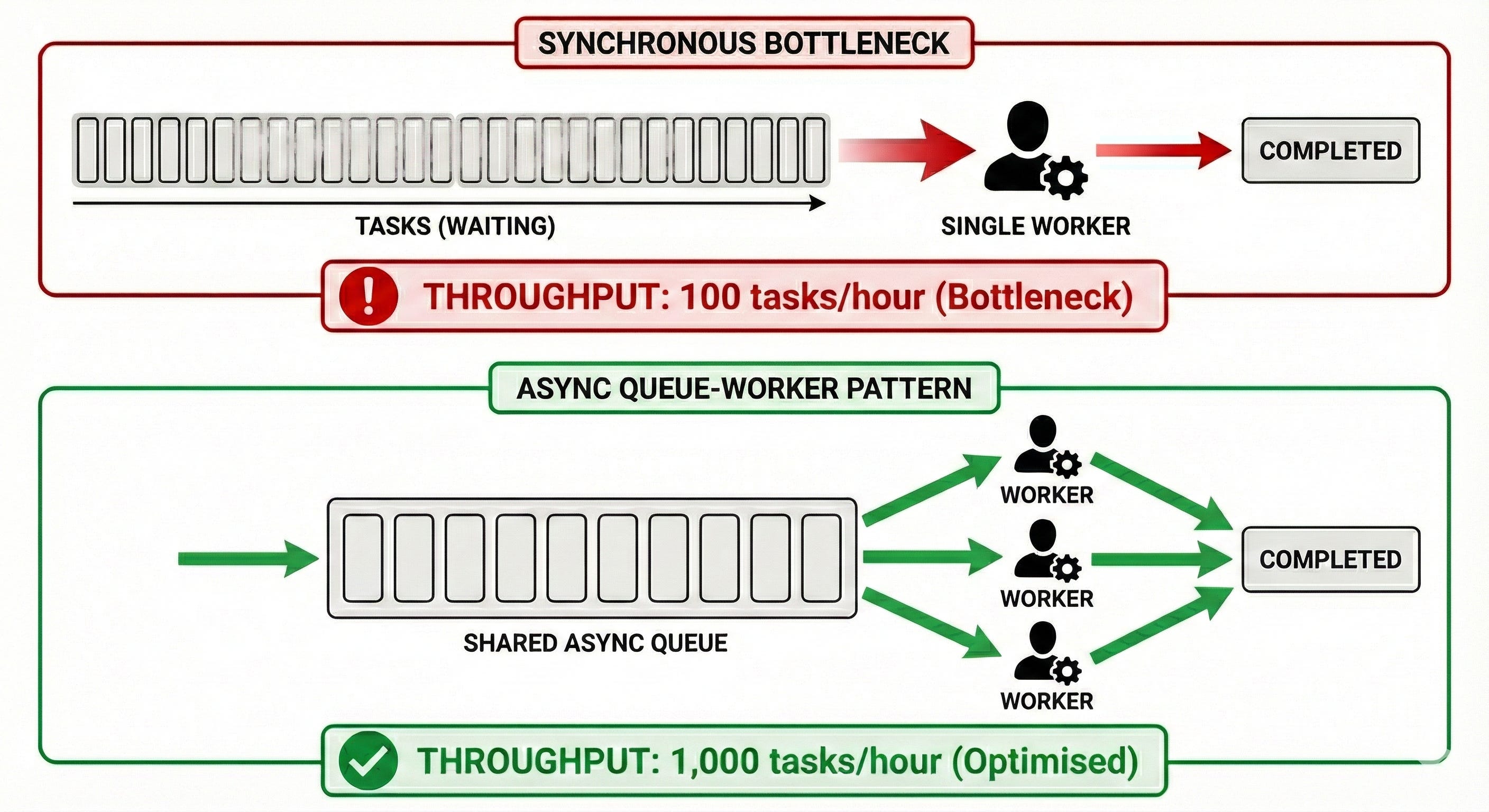
This enables the Queue-Worker pattern: multiple workers poll for queued tasks and execute them concurrently, speeding up workflow execution significantly.
The rule is simple: ensure everything is async, and you’re good to go.
Retry configuration
Temporal’s retry feature is central to durable execution. You can configure:
Maximum retry attempts
Retry backoff coefficient: Exponentially increases the interval between retries
This might handle certain issues, such as rate limits that might occur (although it should not be an issue, as I’ve already spread the API requests along the rate limit given by the API). The backoff coefficient prevents hammering failing services.
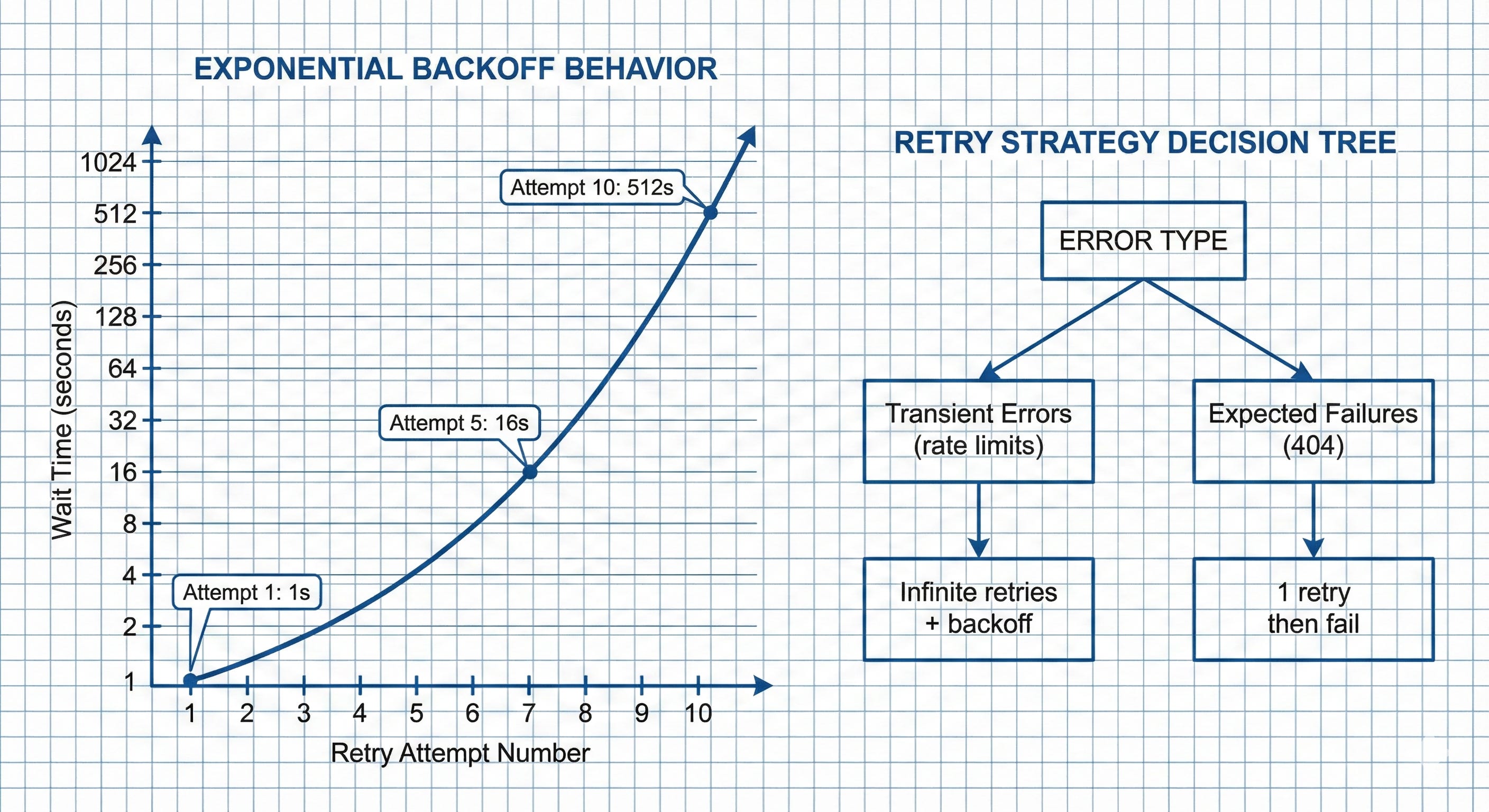
You can also configure processes to retry once and die if failure is expected—for example, when fetching non-existent data, where the process should legitimately fail.
Not everything should retry indefinitely.
Conclusion
Temporal is a powerful alternative for building data pipelines, offering flexibility and reliability beyond simpler orchestrators. For straightforward workflows, a simple solution might suffice. For complex scenarios with edge cases, Temporal’s robust architecture helps you focus on designing processes and writing quality code rather than managing failure states manually.
The learning curve is steep—steeper than Airflow or Prefect—but the durability guarantees and state management capabilities make it worthwhile for production pipelines that need to handle real-world failure scenarios.
Choose the orchestration tool that fits your specific needs. But if you choose Temporal, expect to rethink how you design workflows around durable execution.
Related: See Temporal documentation for comprehensive guides on workflow patterns and best practices.
Ammar Azman is an AI Engineer at Deriv.
Follow our official LinkedIn page for company updates and upcoming events.
 | A guest post by
|