

Killing the credential: Securing cross-cloud AI agents with keyless identity and Dynamic RBAC
How the Agent Auth Hub uses federated identity and human-context verification to control autonomous tool access across clouds

Managing machine identities across different cloud environments is a classic infrastructure headache. When a workload running in AWS needs to trigger a service in Google Cloud Platform or validate permissions against an external Identity Provider like Okta, teams usually default to static API keys or long-lived service account credentials. We have all seen how that story ends. A private key gets accidentally committed to a repository, an engineer leaves an unencrypted file in a storage bucket, and your security operations team spends the entire weekend rotating keys and tracking down a blast radius.
When we first started building basic cross-cloud automation, giving scripts fixed IAM roles or static tokens was the fast path to getting things off the ground. It was a completely reasonable design choice for a small fleet of linear, predictable workloads. But as we step into the era of autonomous AI agents, that early simplicity hardens into a massive architectural failure mode.
The reality is that we have to stop treating agents like legacy machine accounts and start treating them more like human digital workers. Traditional scripts are deterministic; they do the exact same task every single time. Agents are non-deterministic and ever-evolving. They reason, map out operational steps, and choose tools dynamically based on context.
If you stick with static, standing credentials for an AI agent, safely scaling or scoping its functionality becomes an impossible math problem. To give an agent the capability to handle new or complex workflows, you’re forced to permanently expand its static access keys. This quietly accumulates privilege creep until that machine identity has god-mode access across your backend networks.
The risk here is unique and dangerous. If an agent falls victim to a prompt injection attack, a malicious actor doesn’t just exploit a flaw in the application code; they exploit the agent’s standing system permissions. The agent gets tricked into running unauthorised internal loops, turning a trusted, static machine identity into an un-sandboxed rogue crawler operating at machine speed.
Because agents act on behalf of humans, you cannot solve this at the machine layer alone. If an employee in marketing invokes a general-purpose agent, that agent must not be allowed to pivot and query financial ledgers or compliance data just because it possesses the underlying technical capability to call those backend APIs. If it does, any unprivileged user can use prompt injection to escalate their own privileges through the agent, using the machine as an administrative proxy to bypass corporate firewalls.
How do you secure an AI agent across multiple clouds?
Secure a cross-cloud AI agent by replacing long-lived credentials with short-lived federated workload tokens, passing the invoking human’s verified identity alongside every request, and authorising each tool call through context-aware Dynamic RBAC. This prevents the agent’s technical capabilities from exceeding the permissions of the person using it.
The Agent Auth Hub puts this model into practice. Built around a philosophy of security through transparency, it addresses the cross-cloud machine identity problem while giving the defensive engineering community an openly shared architectural blueprint.
Agent Auth Hub architecture at a glance
The architecture has four principal actors:
The human user submits a prompt and their user identity.
The AI agent signs its infrastructure request using its AWS IAM role.
Agent Auth Hub validates both the agent token and the human OIDC token.
The policy engine checks the user’s identity groups before authorising the requested tool.
This dual-token model answers two separate questions: Is this workload trusted, and is this person permitted to perform this action?
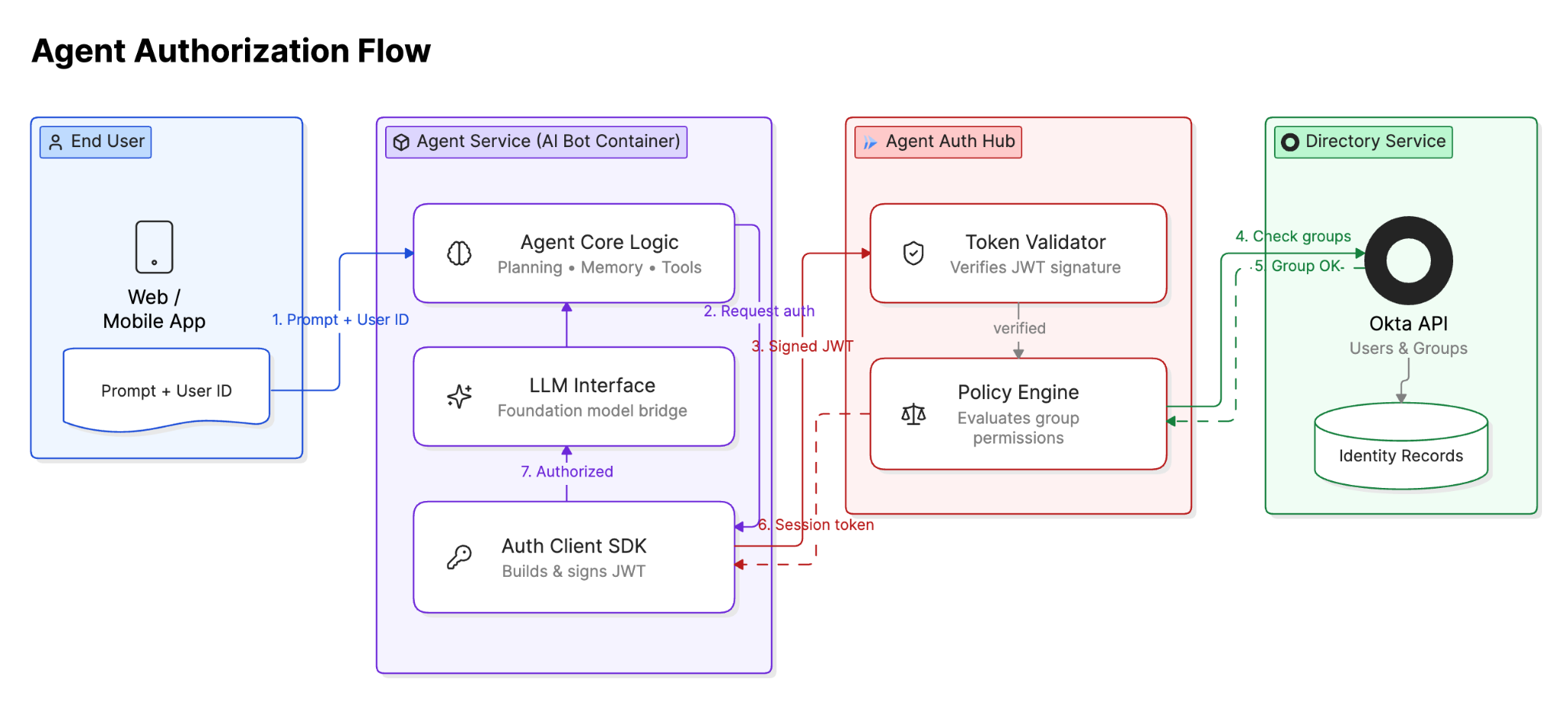
How keyless cross-cloud identity federation isolates AI agents
The Agent Auth Hub ecosystem is split into two highly specialised microservices deployed on Google Cloud Run. The first is agent-auth-hub (The Enforcer), which acts as the main runtime gateway that automated agents invoke to verify system memberships and validate tool execution requests. The second is agent-auth-hub-register (The Onboarding), a restricted bootstrap service used strictly by CI/CD pipelines like GitHub Actions to register new agents and hand out unique machine UUIDs.
To guarantee that an agent’s identity cannot wander off and execute unauthorised actions elsewhere in your cloud infrastructure, we enforce strict resource-level conditional IAM boundaries. Instead of granting the agent broad invoker rights at the project level, its capabilities are locked strictly to the specific Cloud Run service instance.
When setting up the core infrastructure, a single Unified Service Account (hub-enforcer-sa) manages the runtime execution. It holds the permissions required to read secrets from Secret Manager and write audit trails to Cloud Logging. We apply a resource-specific IAM policy binding that allows this service account to call itself when acting as a proxy for incoming AWS traffic, without granting it global privileges across the project.
# Core Variables
PROJECT_ID="your-gcp-security-project"
SA_NAME="hub-enforcer-sa"
SA_EMAIL="${SA_NAME}@${PROJECT_ID}.iam.gserviceaccount.com"

# 1. Create the Core Service Account
gcloud iam service-accounts create $SA_NAME --display-name="Agent Auth Hub Unified SA"

# 2. Grant Secret Manager access to read external verification keys
gcloud secrets add-iam-policy-binding external-provider-token-key \
    --member="serviceAccount:${SA_EMAIL}" \
    --role="roles/secretmanager.secretAccessor" \
    --project=$PROJECT_ID

# 3. Grant Logging Access
gcloud projects add-iam-policy-binding $PROJECT_ID \
    --member="serviceAccount:${SA_EMAIL}" \
    --role="roles/logging.logWriter"

# 4. Resource-Level Binding: The Identity can ONLY invoke this specific service
gcloud run services add-iam-policy-binding agent-auth-hub \
    --region=us-central1 \
    --member="serviceAccount:${SA_EMAIL}" \
    --role="roles/run.invoker" \
    --project=$PROJECT_ID
At runtime, an agent operating within an AWS EC2 instance or an EKS cluster generates a cryptographic signature using its native AWS IAM Role. It sends this signature to GCP’s Workload Identity Federation container (aws-agent-identity-pool). Google verifies the AWS identity and hands back a short-lived GCP token.
Because the federated pool is configured to impersonate the restricted proxy service account, the incoming agent is mathematically locked into the hub service and cannot touch any other Cloud Run deployments or resources inside your cloud ecosystem. Outbound traffic from the hub back to external identity providers exits through a dedicated Cloud NAT gateway, ensuring all verification requests come from a single, allow-listed static IP address.
How human identity context prevents AI agent privilege escalation
To neutralise prompt injection attacks, the hub shifts from basic machine-to-machine validation to a dual-token verification design. When an agent requests data from a secure backend API, it must pass the invoking human’s real-time identity credentials alongside its own workload token. The outbound HTTP request must carry two distinct cryptographic proofs:
The standard
Authorization: Bearer <GCP_TOKEN>header, which proves the agent’s infrastructure is authorised to communicate with the hub.A custom
X-Human-Context: <ID_PROVIDER_JWT>header, which is the raw, untampered, cryptographically signed OIDC token belonging to the human user who prompted the agent.
How the authorisation flow works
An agent running in AWS signs a request with its AWS IAM role.
Google Cloud Workload Identity Federation exchanges that proof for a short-lived token.
The agent sends the workload token and the invoking human’s OIDC token to Agent Auth Hub.
The hub validates both token signatures.
It retrieves the permitted identity groups for the requested tool.
It compares those groups with the human user’s current group claims.
The request is approved or rejected and recorded in the audit trail.
Inside the database layer, which runs on an isolated Cloud SQL PostgreSQL instance, a dedicated governance table maps available tools to the specific identity groups allowed to trigger them. Because using static database credentials inside a keyless architecture would break our entire security model, the hub leverages native GCP IAM Database Authentication. The runtime engine uses the Google Cloud SQL Python Connector to dynamically authenticate via short-lived tokens, eliminating static passwords entirely.
-- Table to register secure tools and their corporate data domains
CREATE TABLE agent_tool_governance (
   id UUID PRIMARY KEY DEFAULT gen_random_uuid(),
   tool_name VARCHAR(100) NOT NULL UNIQUE,
   data_domain VARCHAR(50) NOT NULL,
   required_security_groups TEXT[] NOT NULL,
   status BOOLEAN DEFAULT true,
   created_at TIMESTAMPTZ DEFAULT CURRENT_TIMESTAMP
);
CREATE INDEX idx_tool_governance_name ON agent_tool_governance(tool_name) WHERE status = true;

-- Seed baseline security policies for the finance and compliance domains
INSERT INTO agent_tool_governance (tool_name, data_domain, required_security_groups)
VALUES
    ('query_ledger_balance', 'finance', ARRAY['finance-team', 'sec-ops-admin']),
    ('fetch_compliance_logs', 'compliance', ARRAY['compliance-team', 'sec-ops-admin']);
When the agent-auth-hub receives an operational request, it executes a middleware verification sequence. It decrypts the agent payload, extracts the X-Human-Context header, validates the signature against your enterprise Identity Provider’s public keys, parses the user’s group claims, and checks the database policy store before allowing the tool payload to pass to downstream apps.
Notice how the database connection completely lacks any password fields, relying instead on the enable_iam_auth=True flag:
import os
import jwt
from fastapi import FastAPI, Header, HTTPException, status
from pydantic import BaseModel
from google.cloud.sql.connector import Connector, IPTypes

app = FastAPI()

# Initialize the Cloud SQL Connector for secure, keyless DB access
db_connector = Connector()

def get_db_connection():
   # Connect using short-lived IAM database tokens over the private network connection
   return db_connector.connect(
       os.environ.get("INSTANCE_CONNECTION_NAME"),
       "psycopg2",
       user=os.environ.get("DB_IAM_USER"),  # Format: sa-name@project-id.iam (without the .gserviceaccount.com suffix for Postgres)
       db=os.environ.get("DB_NAME"),
       enable_iam_auth=True,
       ip_type=IPTypes.PRIVATE
   )

class ToolRequest(BaseModel):
   tool_name: str
   agent_uuid: str
   arguments: dict

@app.post("/v1/agent/execute-tool")
async def verify_agent_tool_access(
   request: ToolRequest,
   x_human_context: str = Header(..., description="The OIDC JWT of the invoking human user")
):
   try:
       # 1. Decode and verify the human's real identity token
       user_data = jwt.decode(
           x_human_context,
           os.environ.get("PROVIDER_PUBLIC_KEY"),
           algorithms=["RS256"],
           audience=os.environ.get("PROVIDER_AUDIENCE")
       )
       human_email = user_data.get("email")
       human_groups = user_data.get("groups", [])
   except jwt.InvalidTokenError:
       raise HTTPException(status_code=401, detail="Invalid human context token signature")

   # 2. Evaluate the request against the database governance table
   conn = get_db_connection()
   cursor = conn.cursor()
   try:
       cursor.execute(
           "SELECT data_domain, required_security_groups FROM agent_tool_governance WHERE tool_name = %s AND status = true;",
           (request.tool_name,)
       )
       policy = cursor.fetchone()
       if not policy:
           raise HTTPException(status_code=404, detail="Tool not registered or active")

       data_domain, required_security_groups = policy

       # 3. Intersect user groups with allowed groups
       if not any(group in human_groups for group in required_security_groups):
           print(f"⛔ Security Alert: User {human_email} tried to exploit agent to run {request.tool_name}")
           raise HTTPException(
               status_code=403,
               detail=f"Access Denied: Human context mismatch. You lack permissions for the {data_domain} domain."
           )

       return {"status": "authorized", "target_tool": request.tool_name}
   finally:
       cursor.close()
       conn.close()
Implementation challenges with AWS-to-GCP Workload Identity Federation
Building this system meant wrestling with some quirky client-side authentication behaviours under the hood. For instance, when developers integrate their Python-based agents with our hub, the client code must write the authentication configuration to a temporary local file during execution.
This happens because the native google-auth library contains complex internal verification handlers for AWS metadata environments. This specific code path is triggered only when parameters are loaded from a physical file containing an “environment_id”: “aws1” flag. Trying to run this handshake purely in-memory skips that signature validation path, throwing errors. We chose to handle this file system interaction transparently in our helper scripts rather than masking it behind a wrapper that could fail silently during edge-case network retries.
To deploy this configuration cleanly, you must first grant your Cloud Run service account the explicit IAM roles required to connect to the database instance and authenticate as a database user. Once those permissions are bound, the service is launched with Cloud Run’s direct VPC egress, pointing directly to the Cloud SQL private connection path without a single password secret in sight.
# Core Deployment Variables
PROJECT_ID="your-gcp-security-project"
SA_EMAIL="hub-enforcer-sa@${PROJECT_ID}.iam.gserviceaccount.com"
INSTANCE_NAME="your-gcp-security-project:us-central1:agent-auth-db"

# 1. Grant Cloud SQL Client and Instance User roles to the Cloud Run Service Account
gcloud projects add-iam-policy-binding $PROJECT_ID \
   --member="serviceAccount:${SA_EMAIL}" \
   --role="roles/cloudsql.client"

gcloud projects add-iam-policy-binding $PROJECT_ID \
   --member="serviceAccount:${SA_EMAIL}" \
   --role="roles/cloudsql.instanceUser"

# 2. Deploy to Cloud Run with zero password dependencies
gcloud run deploy agent-auth-hub \
   --source . \
   --region=us-central1 \
   --project=$PROJECT_ID \
   --service-account=$SA_EMAIL \
   --no-allow-unauthenticated \
   --add-cloudsql-instances=$INSTANCE_NAME \
   --set-env-vars="INSTANCE_CONNECTION_NAME=$INSTANCE_NAME,DB_NAME=governance,DB_IAM_USER=hub-enforcer-sa@your-gcp-security-project.iam" \
   --set-secrets="PROVIDER_PUBLIC_KEY=provider-jwks-secret:latest" \
   --network=default \
   --subnet=default \
   --vpc-egress=all-traffic
Key takeaways
Static credentials create excessive standing privileges for autonomous AI agents.
Workload Identity Federation removes the need for long-lived cross-cloud service-account keys.
Human identity context ensures an agent cannot exceed the permissions of the user invoking it.
Dynamic RBAC evaluates access for each tool request rather than granting permanent blanket access.
Resource-level IAM, private networking, short-lived database authentication, and audit logging reduce the potential blast radius.
If an authorised user prompts an agent to check a ledger balance, the request clears the check seamlessly. If a standard user tries to use a clever prompt injection string to coerce the agent into scraping compliance reports, the agent passes the user's true token along, the hub detects the department mismatch, and the request is blocked. By treating agents like evolving digital entities rather than static service accounts, we can scale our automated infrastructure without losing control of our perimeter.
Christopher Hernandez is an AI Team Lead at Deriv.
Follow our official LinkedIn page for company updates and upcoming events.
Join our team to work on projects like this.
 | A guest post by
|
Useful start. Keyless identity helps, but runtime authority is the harder test. A valid agent can still be doing the wrong thing for this workflow. I would shape permissions around resource, operation, human context and expiry, so the verifier can tell whether the credential stayed inside its intended bounds.